Bitflip-Aware LoRA Fine-Tuning#
This tutorial walks through bitflip-aware LoRA fine-tuning on a pretrained LLM
(e.g., unsloth/Llama-3.1-8B).
Note
If you have not set up the environment yet, follow Installation first.
Overview#
Bitflip-aware LoRA fine-tuning combines two ideas:
Random Bitflip Simulation — During the forward pass, random bit flips are injected into both activations and weights of every linear layer (except
lm_head), emulating hardware-level bit errors in approximate or unreliable compute substrates.Low-Rank Adaptation (LoRA) — Instead of updating all parameters, small low-rank matrices (
lora_A,lora_B) are attached to each linear layer; only these are trained. The original pretrained weights are frozen.
By training with bitflip noise present, the LoRA adapters learn to compensate for hardware-induced errors, making the model more resilient at inference time.
How It Works#
Each nn.Linear layer is replaced by a
BitFlipLinearLora
layer whose forward pass computes:
where:
\(X\) — input activation (with optional bitflip noise)
\(W\) — frozen pretrained weight
\(A\) (
lora_A) and \(B\) (lora_B) — trainable low-rank matrices\(\text{scaling} = \text{lora\_alpha} / r\)
\(\text{bitflip}(\cdot)\) — applies random bit flips with configurable per-component probabilities
The model transformation is handled by
transform_llama,
which replaces all nn.Linear modules (excluding lm_head) with BitFlipLinearLora.
Entry Points#
File |
Description |
|---|---|
Main training script (HuggingFace Accelerate, no Trainer). |
|
experiments/llm-bitflip/lora_finetune/fine-tune-bitflip-clm.sh |
Shell wrapper that computes training steps and launches the run. |
Bitflip + LoRA configuration file. |
Step-by-Step Guide#
Step 1 — Configure the Bitflip & LoRA Transform#
The transform configuration is defined in a TOML file.
Default configuration at experiments/llm-bitflip/lora_finetune/transform_cfg.toml:
use_lora = true

[fc]
    w_p_exp = 1.52587890625e-05
    w_p_frac = 1.52587890625e-05
    w_zero_out_t = 1.25
    x_p_exp = 1.52587890625e-05
    x_p_frac = 1.52587890625e-05
    x_zero_out_t = 30.0

[lora]
    r = 32
    lora_alpha = 32
Section |
Parameter |
Description |
|---|---|---|
(top-level) |
|
Enable LoRA adaptation. When |
|
|
Bitflip probability for the sign-exponent bits of the weight. |
|
|
Bitflip probability for the mantissa bits of the weight. |
|
|
Threshold for zeroing out weight outliers / NaN values. |
|
|
Bitflip probability for the sign-exponent bits of the activation. |
|
|
Bitflip probability for the mantissa bits of the activation. |
|
|
Threshold for zeroing out activation outliers / NaN values. |
|
|
LoRA rank. |
|
|
LoRA scaling factor (effective scaling = |
Note
The bitflip probability must be a power of 0.5 (e.g., 0.5^16 ≈ 1.526e-05).
The kernel snaps to the nearest valid value automatically.
Minimum supported probability is 0.5^24 ≈ 5.96e-08.
See Mase-Triton for details.
Step 2 — Understand the Training Budget#
The shell script fine-tune-bitflip-clm.sh automatically calculates the number of
training steps using a budget of 1% of the model’s parameter count in tokens.
For unsloth/Llama-3.1-8B (8B parameters):
fine-tune tokens = 8,000,000,000 / 100 = 80,000,000
tokens per step  = num_gpus × per_device_batch_size × block_size
max_train_steps  = fine-tune tokens / tokens per step
For 8 GPUs, batch size 1, block size 2048:
tokens per step = 8 × 1 × 2048 = 16,384
max_train_steps = 80,000,000 / 16,384 ≈ 4,883 steps
Step 3 — Launch Fine-Tuning#
cd experiments/llm-bitflip/lora_finetune
The shell script accepts positional arguments:
./fine-tune-bitflip-clm.sh [num_processes] [model_name_or_path] \
    [per_device_train_batch_size] [learning_rate] [weight_decay] \
    [gradient_accumulation_steps] [block_size]
Example: fine-tune Llama-3.1-8B on 8 GPUs with default settings:
./fine-tune-bitflip-clm.sh 8 unsloth/Llama-3.1-8B 1 1e-5 0.01 2 2048
This is equivalent to:
uv run accelerate launch --num_processes=8 \
    run_clm_no_trainer.py \
    --model_name_or_path unsloth/Llama-3.1-8B \
    --dataset_name Cheng98/fineweb-edu-1.25B \
    --per_device_train_batch_size 1 \
    --per_device_eval_batch_size 1 \
    --learning_rate 1e-5 \
    --weight_decay 0.01 \
    --num_train_epochs 1 \
    --gradient_accumulation_steps 2 \
    --lr_scheduler_type linear \
    --output_dir ./output/Llama-3.1-8B-bitflip-lora \
    --preprocessing_num_workers 32 \
    --trust_remote_code \
    --with_tracking \
    --report_to wandb \
    --transform_cfg ./transform_cfg.toml \
    --block_size 2048 \
    --log_train_loss_steps 50 \
    --max_train_steps 4883 \
    --wandb_tags unsloth/Llama-3.1-8B,lr1e-5,steps4883
Argument |
Description |
|---|---|
|
HuggingFace model identifier or local path. |
|
Training dataset. We use a 1.25B-token subset of FineWeb-Edu. |
|
Path to the TOML config for bitflip + LoRA. |
|
Context length for training samples. |
|
Log training loss to W&B every N steps. |
|
Total optimizer steps (auto-calculated by the shell script). |
Tip
The first argument to fine-tune-bitflip-clm.sh controls --num_processes.
The script automatically recalculates max_train_steps to maintain the same
total token budget regardless of the number of GPUs.
Step 4 — Monitor Training#
If W&B is configured (wandb login), training loss and validation perplexity are
logged automatically to the Bitflip-CLM-Fine-tune project.
Training loss is logged every 50 steps (configurable via
--log_train_loss_steps).Validation perplexity is evaluated at end of each epoch on the first 64 batches.
Step 5 — Output#
After training, the fine-tuned model (LoRA weights merged into the base model) and tokenizer are saved to the output directory:
./output/Llama-3.1-8B-bitflip-lora/
├── config.json
├── model.safetensors
├── tokenizer.json
├── tokenizer_config.json
└── all_results.json         # Final perplexity
Results#
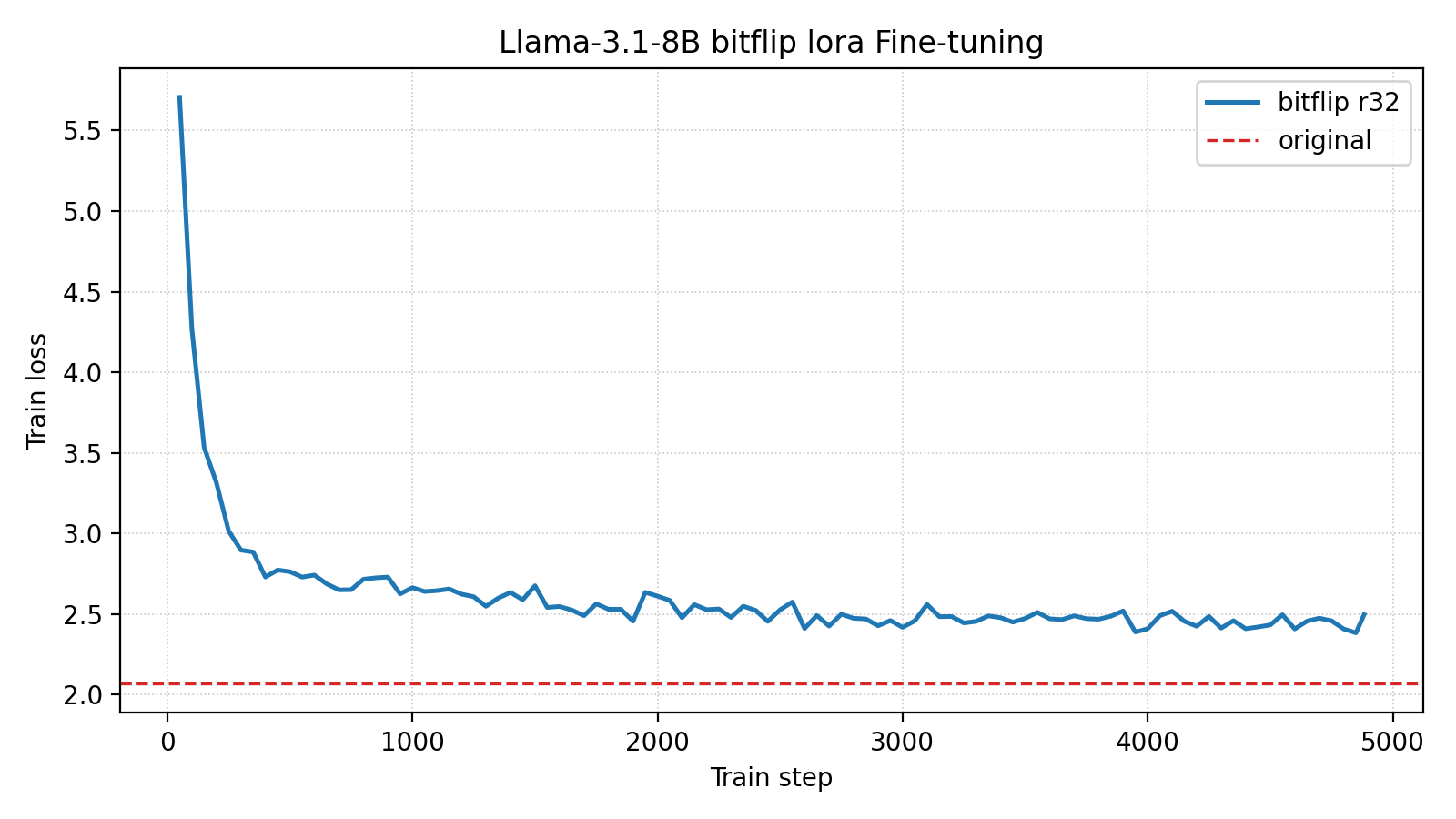
Training Curves#
Metric |
Value |
|---|---|
Final Training Loss (↓) |
2.50 |
Final Validation Perplexity (↓) |
11.01 |
Total Training Steps |
4883 |
Comparison with Baselines#
Bitflipped |
Fine-tuned |
Bitflip config |
Fine-tune config |
Val PPL (↓) |
|---|---|---|---|---|
✘ |
✘ |
N/A |
N/A |
7.91 |
✔ |
✘ |
|
N/A |
1008.95 |
✔ |
✔ |
|
LoRA rank=32 |
11.01 |
LoRA fine-tuning reduces perplexity from 1008.95 to 11.01 on a 7B model — a 99% reduction. Increasing the LoRA rank or using full fine-tuning would likely improve results further.
Resources#
Training config: transform_cfg.toml
Appendix: Evaluation Scripts#
The baseline comparison above was generated with two evaluation-only scripts that reuse
run_clm_no_trainer.py but skip all optimizer steps.
Both share the signature:
./script.sh [num_processes] [model_name_or_path] [per_device_batch_size] \
            [block_size] [eval_max_steps]
Script |
Purpose |
|---|---|
Measures perplexity with bitflips injected but no fine-tuning (bitflipped ✔, fine-tuned ✘). |
|
Clean baseline — no bitflips, no fine-tuning (bitflipped ✘, fine-tuned ✘). |